What is retro web design (and which era do people mean)?
People say "retro web" for three overlapping looks. The Windows 95/98 desktop look is beveled buttons, title bars, and silver chrome. The GeoCities / early-web look is marquees, under-construction GIFs, starfields, and visitor counters. The Y2K / vaporwave offshoot is neon, chrome type, and gradient meshes. They share one instinct: retro is the deliberate opposite of minimalism, maximum visual personality instead of restraint.
The honest pitch for building it: nothing else makes a page feel this much like a place. If minimalism is a clean hotel lobby, retro is your cousin's bedroom in 1998, and sometimes that is exactly the vibe you want.
How do you make a website look retro in CSS?
/* via superdesign.dev/styles/retro */

/* (1) Win95/98 window chrome.
   border-style outset/inset IS the whole trick. But the light/shadow
   faces are derived from the element color, so a colorless outset on a
   dark-text element renders nearly flat. Always set a light border color. */
.win95 {
  background: #c0c0c0;
  border: 2px outset #dfdfdf;     /* raised */
  box-shadow: 1px 1px 0 #000;
  padding: 2px;
}
.win95 .field {
  background: #fff;
  border: 2px inset #808080;      /* sunken */
  padding: 4px 6px;
}
.win95-btn {
  background: #c0c0c0;
  border: 2px outset #dfdfdf;
  padding: 4px 14px;
  color: #000;
}
.win95-btn:active { border-style: inset; }   /* pressed: outset -> inset */

/* (2) blue gradient title bar */
.titlebar {
  background: linear-gradient(90deg, #000080, #1084d0);
  color: #fff;
  font-weight: bold;
  padding: 3px 4px;
}

/* (3) CRT scanlines as a non-interactive overlay */
.crt { position: relative; }
.crt::after {
  content: "";
  position: absolute;
  inset: 0;
  pointer-events: none;
  background: repeating-linear-gradient(
    to bottom,
    transparent 0 2px,
    rgba(0, 0, 0, 0.35) 3px
  );
}

/* (4) tiled starfield.
   Use SEPARATE background-color + background-image. The shorthand
   "background: #000 radial-gradient(), radial-gradient()" with a color
   prefix in front of MULTIPLE gradient layers fails to parse and the
   whole background-image computes to none (browser-verified). */
.starfield {
  background-color: #000014;
  background-image:
    radial-gradient(1px 1px at 20px 30px, #fff, transparent),
    radial-gradient(1px 1px at 90px 70px, #fff, transparent),
    radial-gradient(1px 1px at 130px 20px, #cfe, transparent),
    radial-gradient(2px 2px at 50px 100px, #fff, transparent);
  background-size: 160px 160px;
  background-repeat: repeat;
}

/* (5) chrome / embossed heading via stacked text-shadow */
.chrome-heading {
  color: #e8e8e8;
  text-shadow:
    0 1px 0 #fff,
    0 2px 0 #888,
    0 3px 0 #444,
    0 4px 6px rgba(0, 0, 0, 0.6);
}

/* (6) dotted divider */
.retro-divider { border-top: 1px dotted #fff; }

/* (7) CSS-only animated banner: the non-deprecated <marquee> replacement.
   Honor prefers-reduced-motion so it does not move for users who opt out. */
.marquee { overflow: hidden; white-space: nowrap; }
.marquee span {
  display: inline-block;
  padding-left: 100%;
  animation: scrollx 8s linear infinite;
}
@keyframes scrollx {
  from { transform: translateX(0); }
  to   { transform: translateX(-100%); }
}
@media (prefers-reduced-motion: reduce) {
  .marquee span { animation: none; padding-left: 8px; }
}
The load-bearing values
- border-style outset / inset is the whole trick: outset for raised buttons and windows, inset for sunken fields, and button:active flips outset to inset for the pressed look. Everything else is dressing.
- The bevel-color trap: outset and inset derive their light and shadow faces from the element color, so a plain border: 2px outset on a dark-text element renders nearly flat. Browser-verified: with no color the top and bottom faces both computed to rgb(0,0,0), while border: 2px outset #dfdfdf gave a light rgb(223,223,223) face that actually reads as 3D. Always set a light border color.
- Starfield: use a SEPARATE background-color plus background-image. The shorthand background: #000 radial-gradient(), radial-gradient() with a color prefix in front of MULTIPLE layered gradients fails to parse and the entire background-image computes to none (browser-verified). A single gradient with a color prefix is fine; it is only the multi-layer form that breaks.
- Do not reach for <marquee> or <blink>: <blink> was removed from every browser and <marquee> is deprecated. Ship the CSS-keyframes banner above instead, with a prefers-reduced-motion: reduce guard so it stops moving for users who opt out.
Why Tailwind needs arbitrary values here
- The default Tailwind palette has no Win95 silver and no outset/inset border style, so the faithful path is arbitrary values: border-[#dfdfdf], [border-style:outset], the [background:repeating-linear-gradient(...)] scanline, and the [text-shadow:...] chrome heading.
- Every class in the Tailwind block is either a real default utility or an arbitrary value. None are invented, and the recipe deliberately avoids depending on any specific palette step so it works on any Tailwind config.
Browser support: Every property here is broadly supported. border-style outset and inset are CSS1-era and work everywhere. repeating-linear-gradient, layered radial-gradient backgrounds, text-shadow and ::after are universal in evergreen browsers. The one modern bit is prefers-reduced-motion, supported across all evergreen browsers since around 2020; where it is unsupported the banner simply animates, which is period-accurate anyway. No backdrop-filter or container-query dependency, so no fallback block is needed.
What are the best retro website examples?
A mix of famous live sites and real Superdesign library items. Every URL was confirmed live before listing.
Space Jam (1996)Live site
Warner Bros kept the original 1996 site online: starfield background, <font> tags, planet navigation. The canonical early-web artifact, unedited.
Cameron's WorldLive site
A collage stitched from archived GeoCities pages: marquees, under-construction GIFs, the maximalist early web in one endless scroll.
98.cssLive site
Jonathan Dan's design system for faithful Windows 98 UIs: the exact bevel-and-titlebar recipe on this page, productized into a library.
PoolsuiteLive site
The polished Y2K / cassette-era flavor, proof that retro can read premium rather than kitsch when the craft is high.
Win98Superdesign library
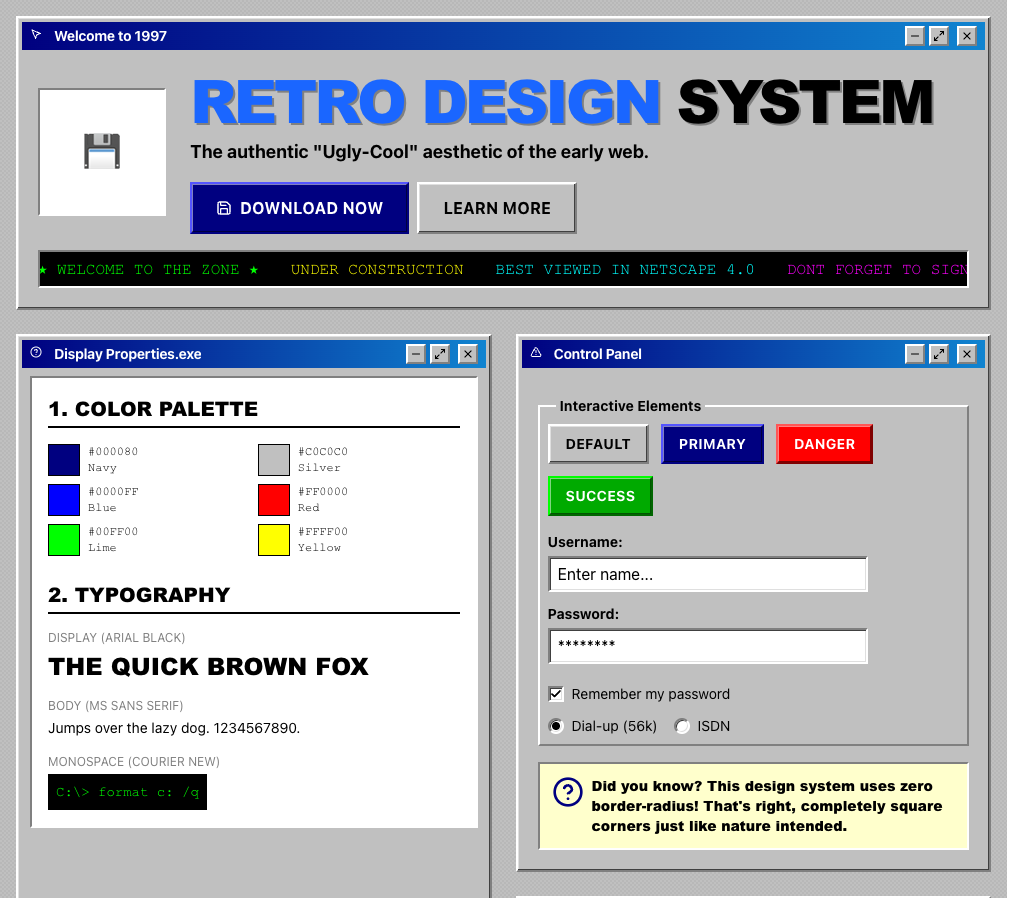
A real generated UI: beveled windows, blue title bars, an UNDER CONSTRUCTION marquee, and color plus type panels. The Win95 lane, end to end.
Bold Retro-ModernismSuperdesign library
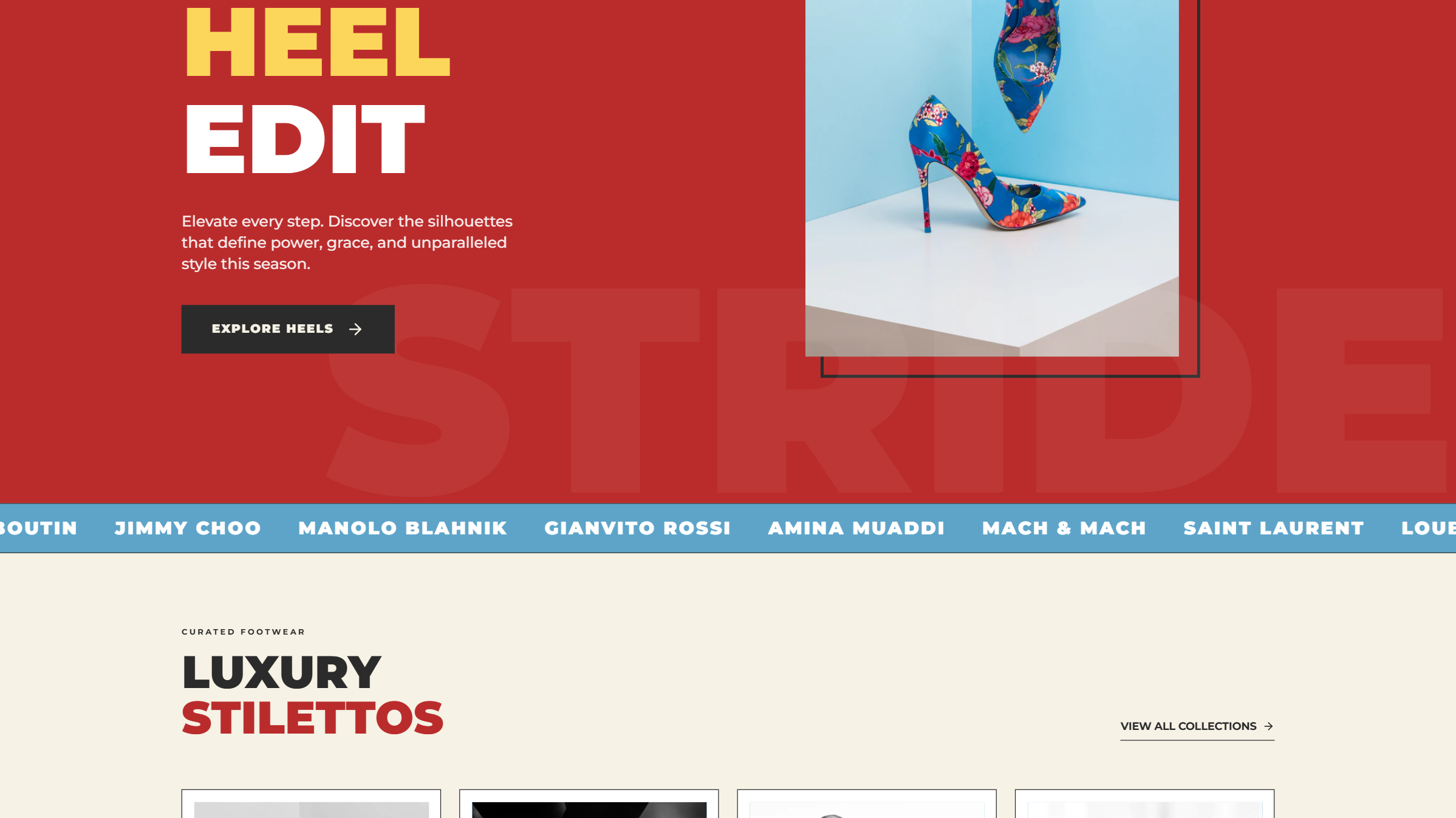
The other retro lane: 1970s editorial, oversized bold type, warm red and cream. Retro without a single bevel, useful contrast to the Win95 look.
Is retro web design still a trend in 2026?
Honestly, it is a small but durable niche, not a surging trend. Across 208,000+ real generations on Superdesign, retro and 90s-nostalgia prompts held a steady fraction of a percent through the spring, dipping mid-year then ticking back up in May.
Retro and 90s-nostalgia requests held a small, steady 0.8 to 1.3 percent of generations January to May 2026, used in 1,109 projects (1,983 prompt mentions): a durable niche, not a surging trend.
*June is month to date. Share of all Superdesign generations whose prompt mentions the style. 1,109 distinct projects, 1,983 prompt mentions total.
Methodology
How we count: numbers come from the prompts of 208,000+ real design generations on Superdesign, January to June 2026. A generation counts as mentioning a style when its prompt contains the style term or a close synonym as a whole word (for example glassmorphic or frosted glass for glassmorphism; the dark mode group counts explicit dark mode and dark theme requests, not every mention of the word dark). One generation counts once even if the term repeats. Distinct projects is the conservative figure: one project can produce many generations. June is month to date, so we show it but do not compare it against closed months. Counts are live and drift slightly day to day.
When should you NOT use retro web design?
Conversion and checkout flows
Accessibility traps
Motion sickness
<marquee> or an infinite-scroll animation moves with no way to stop. Always ship the CSS banner with an @media (prefers-reduced-motion: reduce) guard, or skip the animation entirely for users who opt out.Long-form reading
Brand longevity
The bevel-color trap
border: 2px outset with no light color gives a broken flat box, not a raised button. See the load-bearing values under the recipe above. Set a light border color and it works.Want to see a full retro page before you commit to hand-coding all that chrome? Prompt-to-design renders the whole layout from a sentence, bevels and all.
Generate a retro web design UI
Generate it on Superdesign
This prompt is tuned to the exact tokens in the recipe above. Copy it, paste it into the prompt box, and you get a full UI in this style on an infinite canvas. Free to start.
Design a retro Windows 95/98 desktop UI: a main window with a 2px outset #dfdfdf bevel and a blue #000080 to #1084d0 gradient title bar, a sunken inset input field, OK and Cancel buttons whose bevel flips from outset to inset on press, a silver #c0c0c0 panel background, system/pixel fonts, a CRT scanline overlay, a tiled starfield panel, an embossed chrome heading via stacked text-shadow, a dotted divider, and an UNDER CONSTRUCTION banner that scrolls via CSS keyframes with a prefers-reduced-motion guard. Deliberately ugly-cool, high contrast, anti-minimalist.
Copies the prompt and opens Superdesign in a new tab.
Using the Superdesign skill from Claude Code or Cursor?
Paste this tuned style prompt into your coding agent. It carries the same tokens as the recipe, so what the agent builds matches what this page teaches.
/* Retro / 90s style prompt, via superdesign.dev/styles/retro */
Use a retro Windows 95/98 desktop design system with these tokens:
- Chrome: border 2px outset #dfdfdf for raised, 2px inset #808080 for sunken;
  buttons swap outset -> inset on :active. Silver panel fill #c0c0c0.
- Title bars: linear-gradient(90deg, #000080, #1084d0), bold white text.
- CRT scanlines: a ::after overlay,
  repeating-linear-gradient(to bottom, transparent 0 2px, rgba(0,0,0,.35) 3px).
- Starfield: SEPARATE background-color #000014 + layered radial-gradient stars
  (never the color-prefix shorthand before multiple gradients, it parses to none).
- Headings: embossed chrome via stacked text-shadow; system / pixel fonts for
  chrome and headings, a clean sans for body copy.
- Banners: CSS-keyframes translateX scroll instead of <marquee>; always add an
  @media (prefers-reduced-motion: reduce) guard. Never use <marquee> or <blink>.
- Keep body text >= 4.5:1 contrast and >= 16px even inside the retro chrome.
Frequently asked questions
What is retro web design?
How do I make a Windows 95 style button in CSS?
What fonts are used in retro web design?
Is retro web design still a trend in 2026?
How do I add CRT scanlines in CSS?
Is the <marquee> tag still usable?
Related styles
Brutalism →
The raw-HTML cousin: both reject polish, but brutalism is system-default starkness rather than 90s nostalgia.
Skeuomorphism →
The other nostalgia style: real-object textures and shadows instead of desktop-chrome bevels.
Neumorphism →
Soft same-color bevels versus retro's hard light-and-shadow outset bevels: the same instinct, opposite execution.
Dark mode UI →
The CRT and terminal lane of retro lives here: green-on-black, scanlines, monospace.
Minimalist web design →
The deliberate opposite, and a useful contrast: retro is maximum personality, minimalism is maximum restraint.
Browse every style in the design styles encyclopedia, or steal a ready-made starting point from the prompt library.