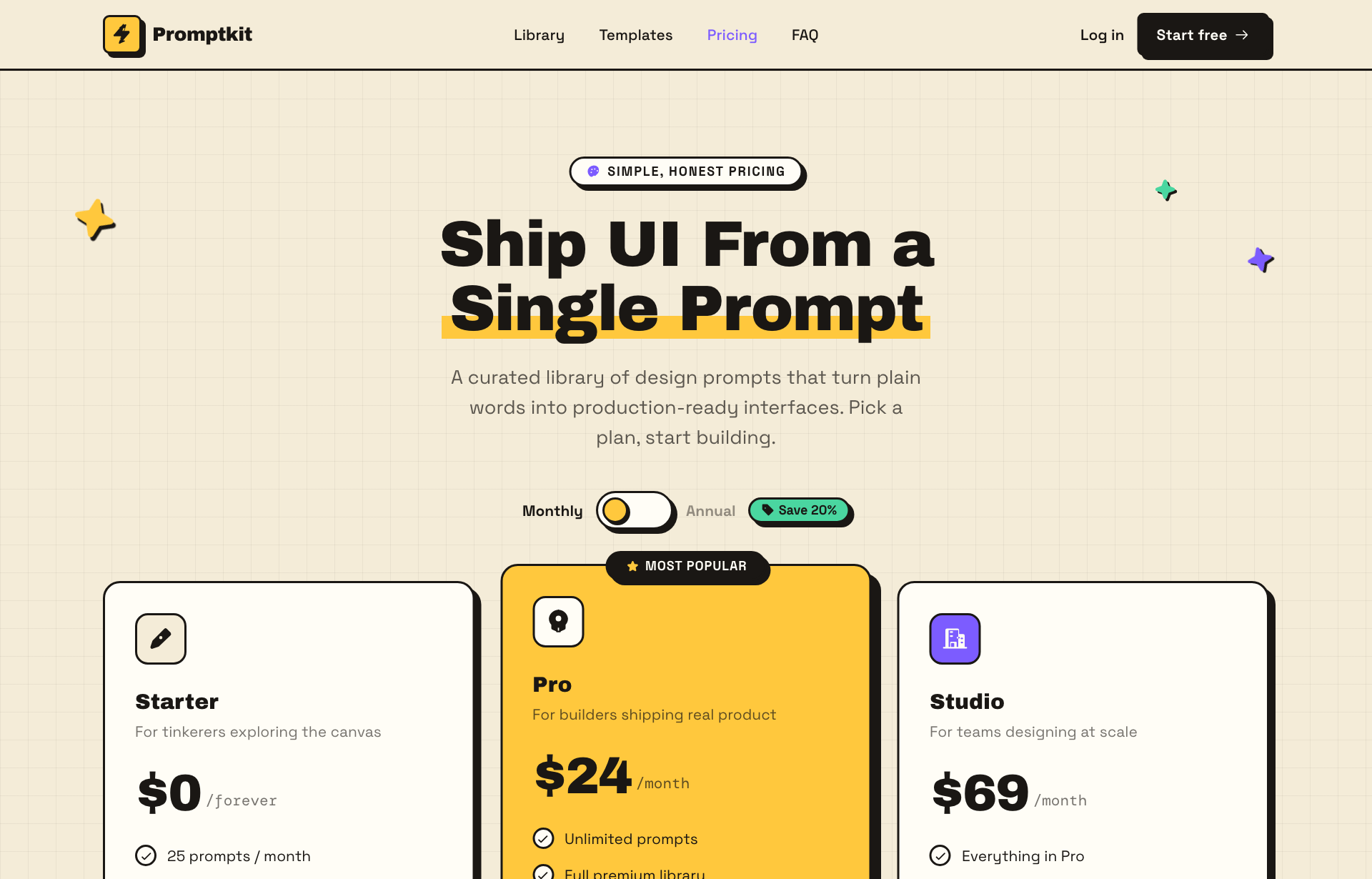
This page is about applying the brutalism recipe to a pricing page. The full CSS recipe (the exact tokens, fallbacks and gotchas) lives on the Brutalism pillar page; here we focus on what changes when the build type is a pricing page, then hand you a prompt tuned for it.
Generate a brutalism pricing page
Generate it on Superdesign
This prompt is tuned to the exact tokens in the recipe above. Copy it, paste it into the prompt box, and you get a full UI in this style on an infinite canvas. Free to start.
Design a neo-brutalist SaaS pricing page on a warm cream canvas (#f4ecd8) with a faint grid texture. Every element gets a thick 2px black outline and a hard, non-blurred offset drop shadow so it reads like a physical sticker. A 3-tier pricing card row (Starter, Pro, Studio) with the middle Pro tier highlighted in mustard yellow, lifted with a bigger shadow offset, and badged Most popular. A pill billing toggle (Monthly/Annual, Save 20%) swaps the price live. Below, an accordion FAQ and a dark inverted footer. Heavy Archivo Black display headings, Space Grotesk body, DM Mono for prices. Tight playful accent palette: mustard, grape purple, mint, coral. Square corners, no soft shadows, no gradients.
Copies the prompt and opens Superdesign in a new tab.
Using the Superdesign skill from Claude Code or Cursor?
Paste this tuned style prompt into your coding agent. It carries the same tokens as the recipe, so what the agent builds matches what this page teaches.
Build a neo-brutalist pricing page (web UI) with these tokens:
- Canvas: warm cream #f4ecd8 with a faint grid; black ink #000
- Every surface: 2px solid #000 border + HARD offset shadow
  (box-shadow: 6px 6px 0 #000, zero blur); square corners
- 3 tiers in a row; featured (Pro) filled mustard #f5c518, lifted with a bigger
  offset shadow, badged "Most popular" (same card shape, so the grid stays aligned)
- Accent palette (tight, playful): mustard, grape purple, mint, coral
- Type: Archivo Black (display), Space Grotesk (body), DM Mono (prices)
- Billing toggle is a chunky pill that swaps price + suffix live
- Contrast is easy here: black on cream and on bright fills; keep it that way
- Dark inverted footer to close; no gradients, no blur

/* via superdesign.dev/styles/brutalism/pricing */
Brutalism pricing page examples
Frequently asked questions
Does brutalist styling hurt or help a pricing page?
How do you make the brutalist hard shadow in CSS?
Keep exploring
Brutalism: the full recipe →
The website with its structure exposed: mono fonts, default-blue links, hard black borders, zero decoration.
Brutalism website →
The same style applied to a website.
Brutalism ui components →
The same style applied to a ui components.
Brutalism ecommerce →
The same style applied to a ecommerce.
Brutalism login page →
The same style applied to a login page.
Browse every style in the design styles encyclopedia.