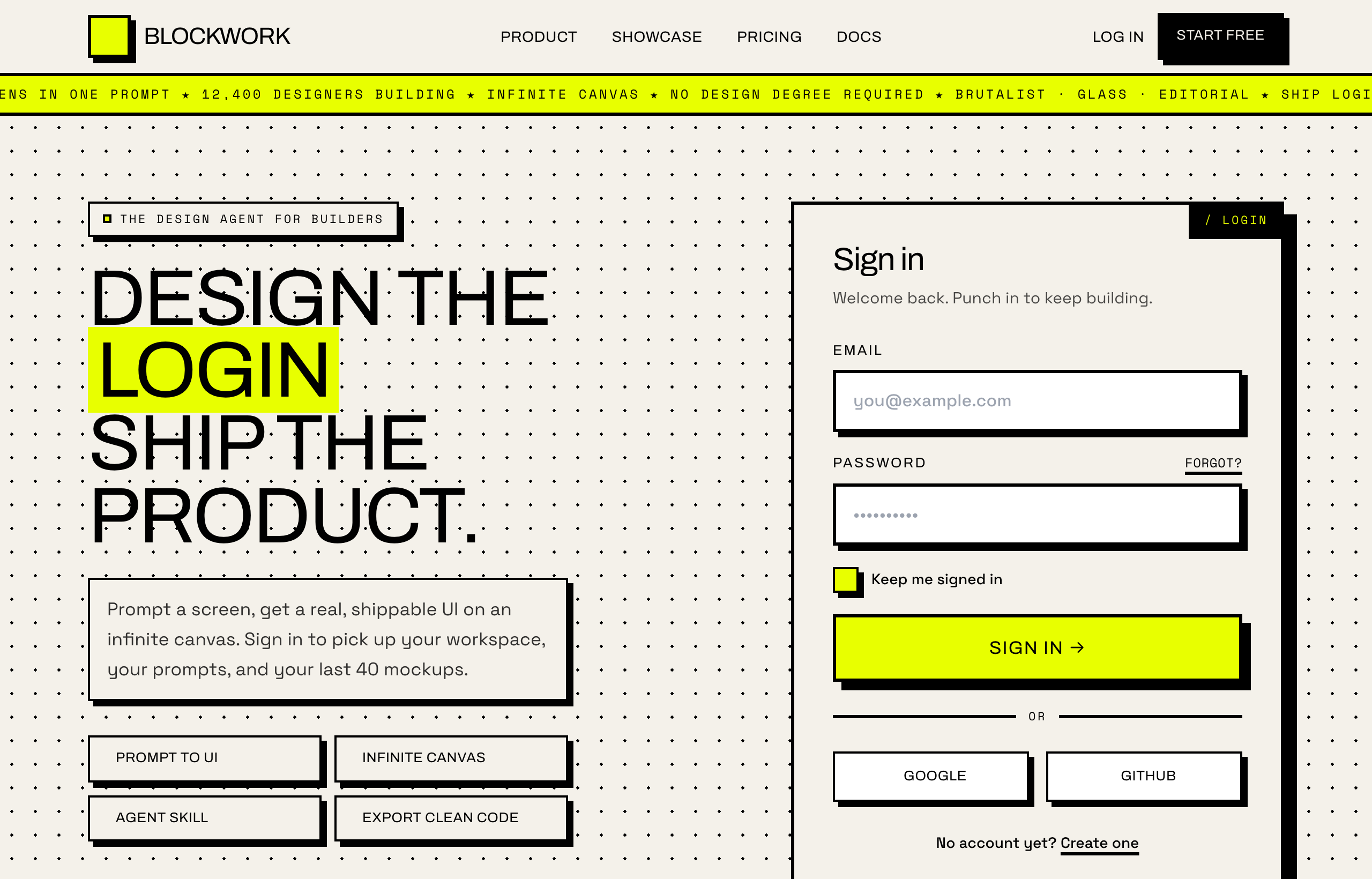
This page is about applying the brutalism recipe to a login page. The full CSS recipe (the exact tokens, fallbacks and gotchas) lives on the Brutalism pillar page; here we focus on what changes when the build type is a login page, then hand you a prompt tuned for it.
Generate a brutalism login page
Generate it on Superdesign
This prompt is tuned to the exact tokens in the recipe above. Copy it, paste it into the prompt box, and you get a full UI in this style on an infinite canvas. Free to start.
Design a neo-brutalist login screen on a warm off-white paper canvas with an electric acid-yellow accent. Thick black borders and hard, non-blurred offset shadows on every surface, square corners. Two-column layout: a left pitch column with an oversized Archivo display headline and an acid highlight box, beside a right brutalist sign-in card with a slash-login corner tab, email and password fields, a chunky acid Sign in button, a keep-signed-in checkbox, and Google plus GitHub SSO. A sticky black-bordered nav sits over a full-bleed acid scrolling marquee. Archivo for display, Space Grotesk for body, Space Mono for labels. High contrast throughout: black ink on paper, black text on the acid button. Inputs use a thick border with an inset focus shift, no soft glows.
Copies the prompt and opens Superdesign in a new tab.
Using the Superdesign skill from Claude Code or Cursor?
Paste this tuned style prompt into your coding agent. It carries the same tokens as the recipe, so what the agent builds matches what this page teaches.
Build a neo-brutalist login screen (web UI) with these tokens:
- Canvas: warm off-white paper #f5f2e8; acid-yellow accent #e9ff00; black ink #000
- Every surface: 2px solid #000 border + HARD offset shadow
  (box-shadow: 6px 6px 0 #000, zero blur); square corners
- Sign-in card: white fill, thick border, a "/ login" corner tab, email +
  password, chunky acid "Sign in" button (black border + BLACK label for contrast),
  keep-signed-in checkbox, Google + GitHub SSO buttons (bordered)
- Type: Archivo (heavy display), Space Grotesk (body), Space Mono (labels)
- Sticky black-bordered nav over a full-bleed acid scrolling marquee
- Contrast is built in: black ink on paper, black-on-acid (never white-on-acid)
- Inputs: thick border + an inset focus shift, no soft glows or rings

/* via superdesign.dev/styles/brutalism/login */
Brutalism login page examples
Frequently asked questions
Can a brutalist login page still be accessible?
Why pair a brutalist login with a marketing pitch column?
Keep exploring
Brutalism: the full recipe →
The website with its structure exposed: mono fonts, default-blue links, hard black borders, zero decoration.
Brutalism website →
The same style applied to a website.
Brutalism ui components →
The same style applied to a ui components.
Brutalism ecommerce →
The same style applied to a ecommerce.
Brutalism pricing page →
The same style applied to a pricing page.
Browse every style in the design styles encyclopedia.