AI breaks your design system for one reason: it generates UI without real access to your components and tokens, so it approximates. It does not throw an error, it does something quieter and more expensive. It fabricates a plausible token, drifts on your spacing mid-build, forgets your decisions by tomorrow, and keeps using a component prop you renamed last sprint. The output looks on-brand at a glance and is off-system underneath, which is harder to catch than something obviously wrong. The fix is not a better prompt, it is constraining what the model can use and checking what it produced. This is the honest version of why drift happens and how to stop it.

What is AI design system drift?
AI design system drift is the slow divergence between your real design system and what an AI agent generates against it. Each generation is a little off (a different spacing value here, an invented color there, a component rebuilt instead of reused) and across a multi-screen product those small misses compound until the brand goes blurry. It is the sibling of AI slop: slop is convergence on the generic average, drift is divergence from your specific system. A page can avoid slop and still drift, because looking polished and matching your system are two different bars.
The clearest way to see it is one component across a few screens. You define a single primary button. The agent, never having read your system, ships a slightly different one every time:
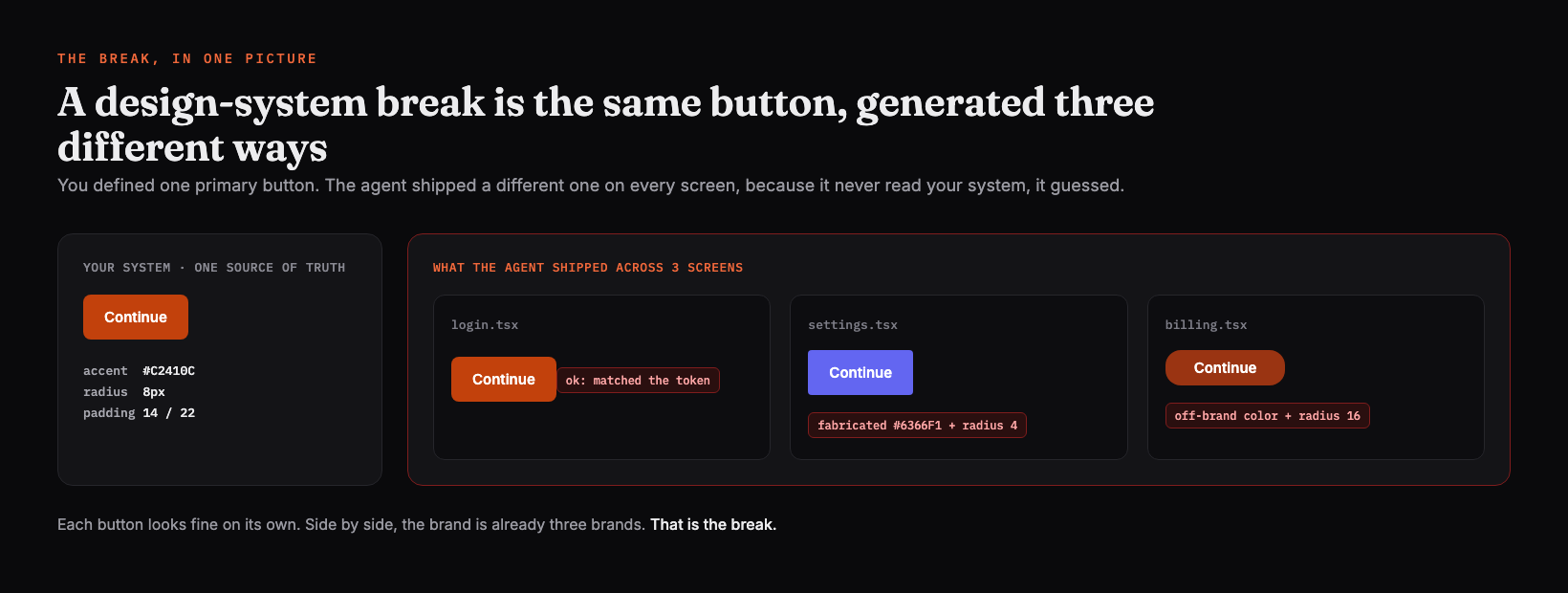
The reason it is so easy to miss is that drift ships. As UXPin puts it, a generated button that looks like yours but lacks your loading state and tokens is "off-system work that looks on-brand, which is actually worse than off-system work that looks obviously wrong, because it is harder to catch."
The four ways AI breaks your design system
There are four distinct failure modes, and naming them is the first step to catching them. DLS Lead catalogued them cleanly, and they match what teams report everywhere.
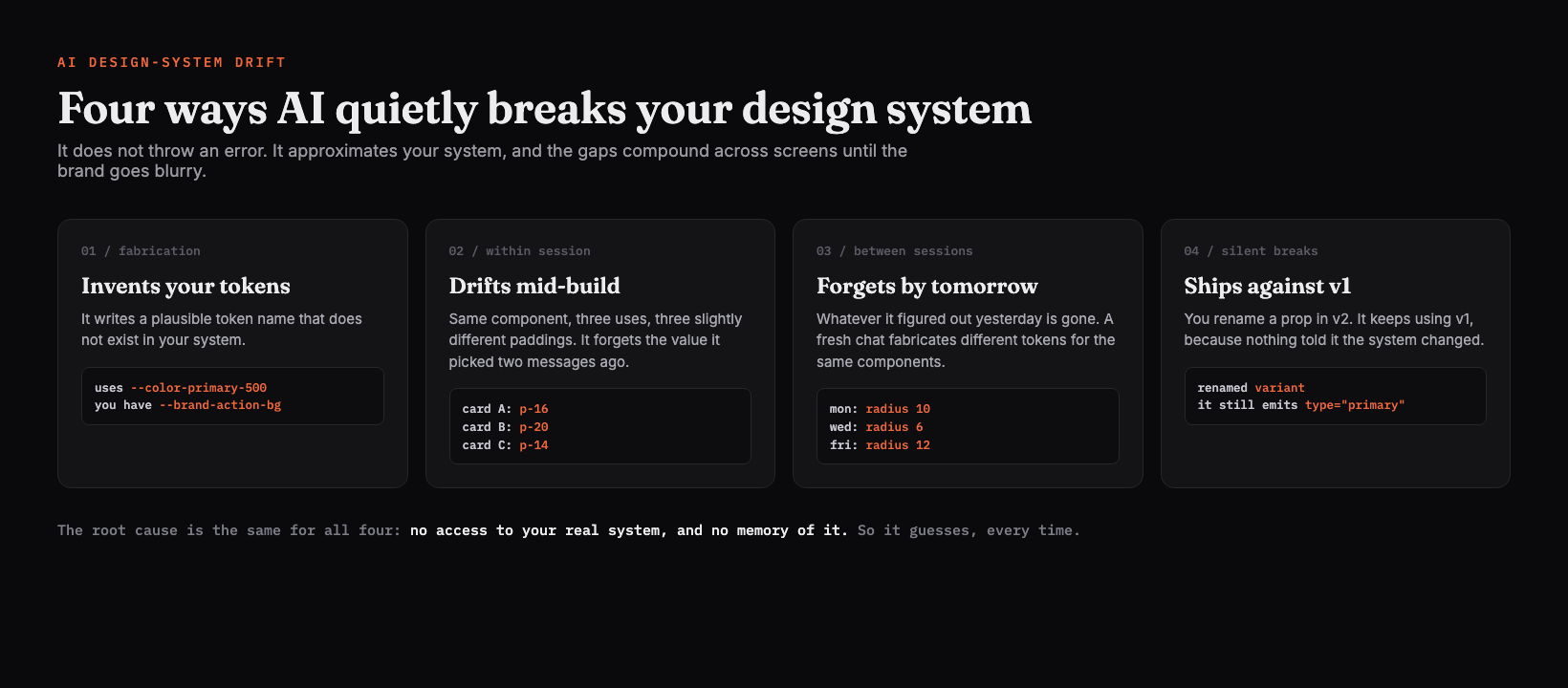
- Token fabrication. The model writes a plausible name that does not exist. It reaches for
--color-primary-500when your system uses--brand-action-bg. The name sounds right, so it sails past a quick read. - Within-session drift. Same component, three uses, three slightly different paddings. It loses the value it chose two messages ago, so consistency decays inside a single sitting.
- Between-session amnesia. Whatever it figured out yesterday is gone. A fresh chat fabricates different tokens for the same components, so Monday's build and Wednesday's build quietly disagree.
- Silent breaking changes. You ship v2 of a component with a renamed prop. The model keeps emitting v1, because nothing told it the system moved.
As DLS Lead puts it after listing these: "Then teams blame the prompt." The prompt is not the problem.
Why does AI break your design system?
Because a language model has no access to your real system and no memory of it, so it does the only thing it can: it guesses from the statistical average of all the UI it was trained on. AutonomyAI frames the mechanism precisely: "AI breaks your design system when it generates UI without access to your actual components, tokens, and usage rules." The model is not being careless, it literally cannot see your Tailwind config, your component APIs, or the reasoning behind your spacing scale unless you put them in front of it.
Rork found the same root cause behind regeneration drift: "Generative AI excels at filling in what you did not specify, so it plausibly reconstructs the unspoken parts, colors and spacing, every time. That reconstruction was the true source of the drift on each regeneration." Anything you leave unsaid, it re-invents.
What drift actually costs you
The cost is not a crash, it is a tax that is easy to underprice. Three forms of it:
The hidden cost of drift
- ✕Component debt: every off-system element lacks your states, tokens, and validation, so it has to be rebuilt before it ships
- ✕Rework over features: time shifts from building to fixing drift, and review cycles expand to catch it
- ✕Token and credit burn: every correction round reloads context and regenerates, tens of thousands of tokens per fix on a capped plan
- ✕Prompt lock-in: once the AI is the only way to edit the output, every spacing tweak is another round-trip
- ✕Trust erosion: people stop trusting the system and quietly fall back to doing it by hand
Verbatim from AutonomyAI + UXPin + Lightning UX
Lightning UX puts the token side bluntly: every correction round "reloads context, reasons about the change, and regenerates the output," and on a capped or credit-based plan those wasted rounds are what throttle you mid-sprint. The dollar cost of tokens is small, the throughput cost is not.
How do you stop AI design system drift?
You stop guessing by constraining what the model can use and validating what it produces. The teams who solve this, per AutonomyAI, "treat their design system as a programmable interface that the AI must follow." Four moves, in order of leverage.
Stop the drift
Freeze your tokens in one file the AI reads, never regenerates
Put colors, spacing, type, and radii in a single source of truth a human owns. The AI references it, it never re-invents it. This is what a DESIGN.md is for.
Constrain it to your real components, not free generation
Hand it your component APIs and let it assemble, not invent. The agent should reach for your Button, not hand-roll a new one with the wrong props.
Lock the stable parts so regeneration stops drifting
Anchor your layout, header, and sidebar, and edit only the content zone, so a redo references your frozen tokens instead of reconstructing them.
Validate the output against the system before it ships
Lint for raw hex and off-system elements, and run a render-screenshot-compare loop, because the agent that wrote the code cannot judge whether it matches.
The single highest-leverage move is the first one: a design-system file the agent reads every session. That is exactly what a DESIGN.md does, it pins your visual language so the agent reaches for your values instead of fabricating new ones. Here is a tiny one, the part that kills token fabrication:
---
# Pin the tokens so the agent cannot invent them
colors:
brand-action-bg: "#C2410C"   # the ONLY primary action color
surface:         "#FBF7F0"
ink:             "#1F1B16"
spacing:
base: 8                       # 8px grid; use multiples only, never raw px
scale: [8, 16, 24, 32, 48]
radius: { sm: 4, md: 8 }        # two steps, not ten
---

## Rules
- Use ONLY the tokens above. Never emit a raw hex value or an off-scale padding.
- Reuse existing components. Do not hand-roll a Button, Card, or Input.
- If a token you need does not exist, stop and ask. Do not invent one.
The "stop and ask, do not invent one" line is the whole game. It turns silent fabrication into a visible question.
A DESIGN.md alone does not fix drift
Honestly, the file is necessary but not sufficient, and this is the part the hype skips. A static file pins your tokens, but agents still drift on application (how to compose a layout, when a rule bends, a component the file never mentioned), and a file you write once goes stale the moment your real system changes. The most useful framing comes from the UXMagic workflow: the durable fix is "context engineering," a canonical project state plus locked anchors plus component assembly, not a single document you paste and forget. The file is the floor. The loop around it is the fix.
That is the gap Superdesign is built to close. Instead of asking you to hand-write and hand-maintain a DESIGN.md, its skill reads your real repo and derives the design-system file from the code you already have, so the system the agent follows matches the system you actually ship. Then it explores on a canvas and hands back real React and Tailwind, so the loop runs from your-system-in to on-brand-code-out. You drive it from your coding agent (Claude Code, Cursor, or any agent):
npm install -g @superdesign/cli@latest
superdesign login
npx skills add superdesigndev/superdesign-skill
Two pieces are useful even if you never install it: the free prompt library of proven, copyable prompts, and the free Chrome component grab that turns a real component into clean Tailwind you can feed the agent as a concrete reference.
Drift, slop, and the screenshot loop fit together
These are three angles on the same root problem (a blind, forgetful model) and the fixes stack. Slop is the generic average, fixed by giving the model a point of view. Drift is divergence from your system, fixed by a design-system file plus component constraints. And both need the screenshot loop from the Claude Code guide: render it, screenshot it, compare against the reference, because the model cannot see its own output. If you are assembling a kit, the best Claude Code skills roundup covers which design skills help and where each one stops.
Drift is not a model that is bad at design. It is a model designing from a system it was never allowed to see. Show it the system, constrain it to the system, and check it against the system, and the drift stops being your problem to clean up.